
Apparently imagesetthickness doesn't work if antialiasing is set to true.
PHP.mk документација
imagesetthickness
Почист и полокален преглед на PHP референцата, со задржана структура од PHP.net и подобра читливост за примери, секции и белешки.
Патека
function.imagesetthickness.php
Локална патека за оваа страница.
Извор
php.net/manual/en
Оригиналниот HTML се реупотребува и локално се стилизира.
Режим
Прокси + превод во позадина
Кодовите, табелите и белешките остануваат читливи во истиот тек.
Референца
function.imagesetthickness.php
imagesetthickness
Референца за `function.imagesetthickness.php` со подобрена типографија и навигација.
imagesetthickness
(PHP 4 >= 4.0.6, PHP 5, PHP 7, PHP 8)
imagesetthickness — (PHP 4 >= 4.0.6, PHP 5, PHP 7, PHP 8)
= NULL
imagesetthickness() Поставете ја дебелината за цртање линии
thickness pixels.
Параметри
-
image А GdImage не применува никакво полнење, така што ширината на сликата мора да биде множител на 8. Ова ограничување веќе не важи од PHP 7.0.9. imagecreatetruecolor().
thickness-
ја поставува дебелината на линиите нацртани при цртање правоаголници, полигони, лакови итн.
Вратени вредности
Секогаш враќа true.
Дневник на промени
| Верзија | = NULL |
|---|---|
| 8.0.0 |
image беше вратено при неуспех. GdImage
инстанца сега; претходно, валидна gd resource се очекуваше.
|
Примери
Пример #1 imagesetthickness() example
<?php

// Create a 200x100 image
$im = imagecreatetruecolor(200, 100);
$white = imagecolorallocate($im, 0xFF, 0xFF, 0xFF);
$black = imagecolorallocate($im, 0x00, 0x00, 0x00);

// Set the background to be white
imagefilledrectangle($im, 0, 0, 199, 99, $white);

// Set the line thickness to 5
imagesetthickness($im, 5);

// Draw the rectangle
imagerectangle($im, 14, 14, 185, 85, $black);

// Output image to the browser
header('Content-Type: image/png');

imagepng($im);
?>
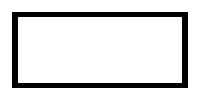
Горниот пример ќе прикаже нешто слично на:
Белешки од корисници 9 белешки
Дебелина, во пиксели. 
пред 17 години
bpatru на gmail точка com 
пред 13 години
thanks circle14,

just change the line & see its solved what we need for ellipse

while ($line < $thickness) {
        $line++;
        $elipse_w--;
        imageellipse($image, $pos_x, $pos_y, $elipse_w, $elipse_h, $color);
        $elipse_h--;
    }
azinkey на gmail точка com 
19 години пред
Note: Also, for me (working under PHP 5.0.2) this function ONLY seems to work with imageline...
ab на cd точка com 
пред 16 години
One thing worse to mention is that imagesetthikness() works on the next object you draw.
For ex : you can draw a grid within a grapg with a thickness of 1

by invoking imagesetthickness($image, 1);

... script to draw your grid...

and then invoke imagesetthikness with a draw your graph lines with a thickness of 3
imagesetthickness($image, 3);
... script to draw your graph lines...

Hope this helps...
fred на nowhere точка fr 
пред 17 години
An easier to manage thickness is, before to draw in the ellipse to play with 2 ellipse with different color :

<?php
        imagefilledellipse  ($this->image,60,42,57,57,$drawColor);
        imagefilledellipse  ($this->image,60,42,45,45,$backColor);
?>

The first line draw a filled ellipse with the wanted color, and the 2nd one, draw an ellipse with the background color from the same center, but is smaller.

The drawback of this method is that you erase everything in the middle of the ellipse.
jean-raymond dot chauviere на gmail точка com 
пред 10 години
As you can see in the example image, the left and right sides are 1 px wider than they should be, this is the case for every width > 1.
Wrote this function to fix that bit.. probably not a drop-in replacement though. It draws a rectangle *around* the given coordinates, for any width line.

<?php
// draw a $width-wide line AROUND the given coordinates, keeping in mind 0,0,1,1 yields a 2×2 square
function imagelinerectangle($img, $x1, $y1, $x2, $y2, $color, $width=1) {
    imagefilledrectangle($img, $x1-$width, $y1-$width, $x2+$width, $y1-1, $color);
    imagefilledrectangle($img, $x2+1, $y1-$width, $x2+$width, $y2+$width, $color);
    imagefilledrectangle($img, $x1-$width, $y2+1, $x2+$width, $y2+$width, $color);
    imagefilledrectangle($img, $x1-$width, $y1-$width, $x1-1, $y2+$width, $color);
}
?>
gmail.com@mspreij 
пред 17 години
Here is a custom function I wrote that addresses the line thickness issues with ellipses :

<?php
function draw_oval ($image, $pos_x, $pos_y, $elipse_width, $elipse_height, $color, $px_thick) {
    $line = 0;
    $thickness = $px_thick;
    $elipse_w = $elipse_width;
    $elipse_h = $elipse_height;
    while ($line < $thickness) {
        imageellipse($image, $pos_x, $pos_y, $elipse_w, $elipse_h, $color);
        $line++;
        $elipse_w--;
        $elipse_h--;
    }
}
?>

I hope you find this useful.
knj at aider dot dk 
пред 18 години
The way that imagesetthickness works with imagerectangle() is pretty strange.

<?php
imagesetthickness(1);
imagerectangle($im, 10, 10, 50, 50, $red);
?>

This will draw a 41x41 square (because gd need the bottom right pixel, inclusive. 50 should get replaced by 49). This will "work" like:

<?php
imageline($im, 10, 10, 10, 50, $red);
imageline($im, 10, 10, 50, 10, $red);
imageline($im, 50, 10, 50, 50, $red);
imageline($im, 10, 50, 50, 50, $red);
?>

The second example:

<?php
imagesetthickness(2);
imagerectangle($im, 10, 10, 50, 50, $red);
?>

This will draw a 43x43 square because the border (thickness) is set to 2. *however* this is not a "regular" border of 2 pixels around the 41x41 original square!

On the left and right, there will be a thickness of 3, while there we be a thickness of 2.

If you take the imageline example, but set the thickness before to 2, this will *almost* do the trick: the left most pixel of the square will not be drawn.

To conclude:

1) do not forget that (width, height) of drawn rectangle is (x2-x1+1, y2-y1+1)
2) thickness is bad implemented (or at least, the behavior i s not documented) on rectangle, as the left/right thickness is not the wanted one.
3) 4*imageline() should do the trick, but after "patching" the top left pixel.